debian systemd usage sample

I stole info from https://wiki.debian.org/systemd

Show system status:
$ systemctl status

List failed units:
$ systemctl –failed
# systemctl reset-failed

List installed unit files:
$ systemctl list-unit-files

List all running services:
$ systemctl

Activates the service “example1” immediately:
# systemctl start example1

Deactivates the service “example1” immediately:
# systemctl stop example1

Restarts the service “example1” immediately:
# systemctl restart example1

Shows status of the service “example1”:
# systemctl status example1

Enables “example1” to be started on bootup:
# systemctl enable example1

Disables “example1” to not start during bootup:
# systemctl disable example1

Posted in Linux/Unix | Leave a comment

speedup slow Mozilla Thunderbird email client on Windows 7

How to speedup slow Mozilla Thunderbird email client on Windows 7


Worked for me, reposting.

Edit Thunderbird options under Preferences → Advanced → General tab, click on “Advanced options” button and set these values:
layers.acceleration.disabled = true
gfx.direct2d.disabled = false
restart Thunderbird.
Disable AeroGlass: Install the “NoGlass” Addon which is available in the Thunderbird addon repository.
Disable Folder Indexing:
If you have folders with many emails inside, Indexing can slow down Thunderbird. Go To Preferences → Advanced → General tab and disable the Global search.
Cleanup Thunderbird index files:
Thunderbird creates a lot of index files. A cleanup of these files can speedup Thunderbird as well, especially if some of them are broken. There is a handy tool called ThunderFix to do that.
or here thunderfix

Posted in Administration | Leave a comment

rsync over samba on debian 8 jessie for switching to newer hardware

On server swap it is needed to move data from one server to another with preserving all attributes and access times.
New server is installed from clean (just for fun and to prevent some old errors from updates or hacks if any 🙂
1. All same packages were installed as on server from which is migrated, here in after as oldserver (did it manually, however can be automated)
2. All same users as on oldserver (also manually) + copying /etc/shadow passwords into new server.
3. Samba conf file transfer with files that hold auth information. In this case smb.conf has passdb backend = tdbsam entry, so had to copy /var/lib/samba/private/passdb.tdb from oldserver
4. mount oldserver’s directory to new server.
# mount.cifs //192.168.1.1/fs /mnt/server-fs/ -o username=USER

it asks password, enter it. Then, when mounted, rsync all files from oldserver to newserver:
the command below will move all files from /mnt/server-fs to /fileserver, with deleting /fileserver/ sub-directories and files if exists.
# rsync -a –verbose –delete-during /mnt/server-fs/ /fileserver

now shutdown old server, change ip and name on new server to old servers one, reboot, and file server can be used.

Update 2024-11-25

If there is wish to sync files without removing:

# mount.cifs //10.10.10.10/fs /mnt/fs10/ -o ro,username=username
# rsync -a -p -o -g –verbose /mnt/fs10/ /fileserverdir/
or
# rsync –archive –perms –owner –group –verbose /mnt/fs10/ /fileserverdir/

after that still require to check permissions on the files wished, comare to old server and set same on new
# chmod -R 775 /fileserverdir
# chown -R user10:gropu10 /fileserverdir

Posted in Administration, Linux/Unix | Leave a comment

MiniSAS, MiniSAS HD, IPASS, SFF8087, SFF8643 example

Always need this information, decided to create post for it.
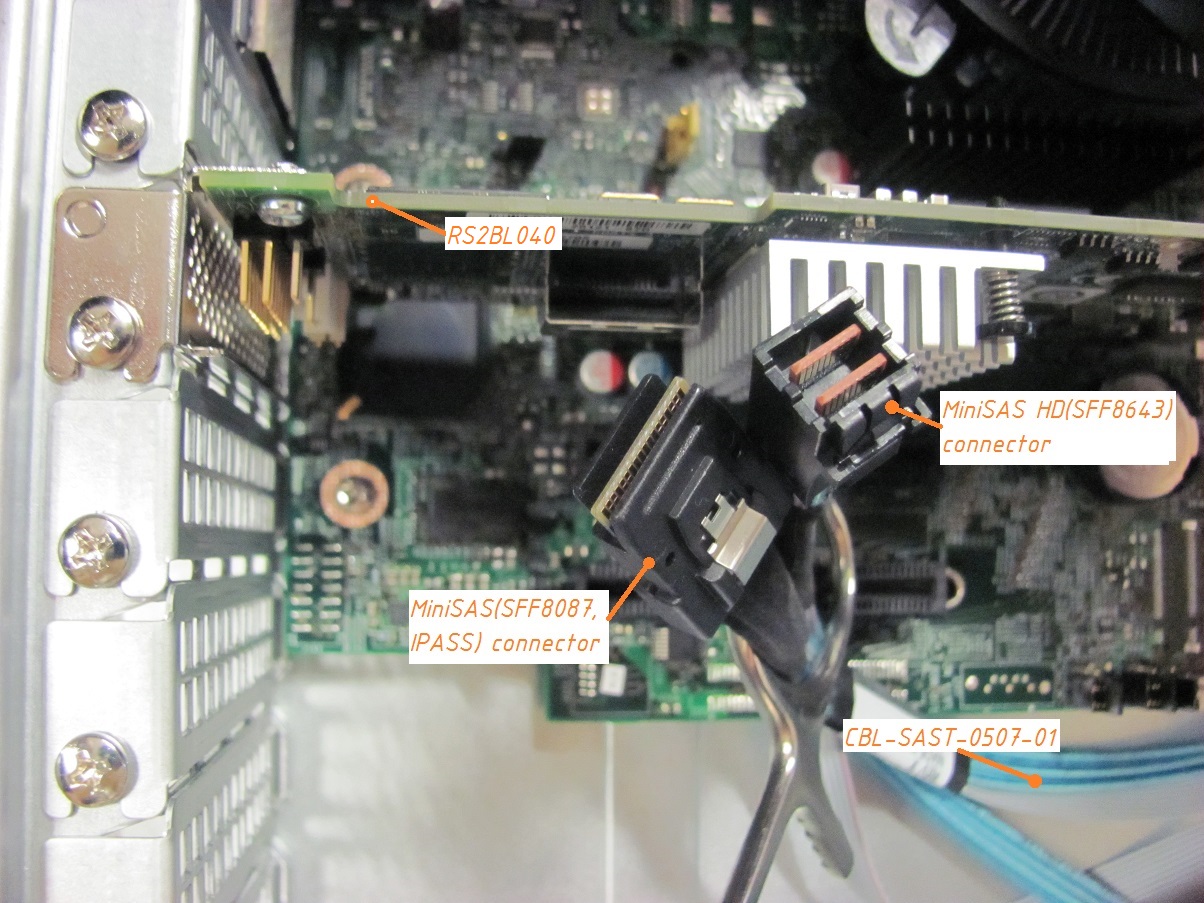
CBL-SAST-0507-01 HD SAS -> mSAS(SFF8087) SFF8643 to SFF8087 Mini SAS Cable
cable suits to rs2bl0x0 (miniSAS or ipass or sff8087) and hdsas backplane on supermicros cse-826be1c-r902lpb, like this one: https://www.supermicro.com/products/chassis/2U/826/SC826BE1C-R920LPB

CBL-SAST-0531 na HD SAS -> HD SAS Internal SAS cable SFF8643 to SFF8643 (mini SAS HD to mini SAS HD) 80cm,30AWG,12Gb/s
cable suits to rs3dc0x0 (mini SAS HD or SFF8643) and hdsas backplane on supermicros cse-826be1c-r902lpb

Posted in Administration, hardware, Linux/Unix, windows | Leave a comment

thunderbird (45.7.1) local folders arhive transfer to another profile

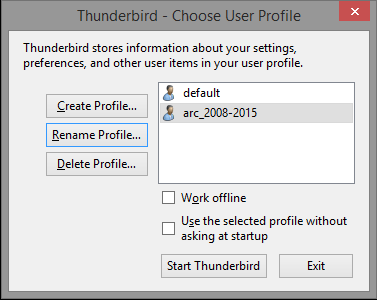
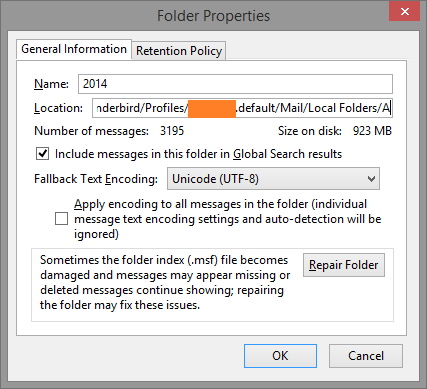
I run Thunderbird (45.7.1) for my emails with two profiles: First is current and another is with old archives. Once a year I want to transfer old archive folder from current profile to backup profile. In windows, Open

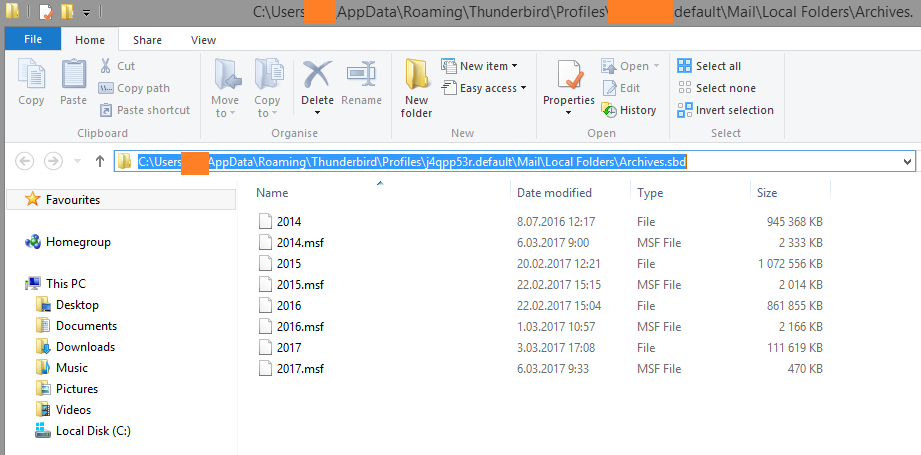
start>run> %appdata%\Thunderbird\Profiles\XXXXXXX.default\Mail\Local Folders\Archives.sbd

%appdata% variable in my windows installation means C:\Users\USERNAME\AppData\Roaming folder.
Copy required archive files to another profile. Check if the folders present in backup profile, then these folders can be deleted from current profile.

Posted in Administration, windows | Leave a comment

ddrescue map file bad sectors position counting

If hdd failed and image recovered by ddrescue, might be necessary to know the failed sectors positions.
For example hdd failed and recover by ddrescue /dev/sdd /dev/null /root/1tb.log –force
log
its content:

# Rescue Logfile. Created by GNU ddrescue version 1.19
# Command line: ddrescue /dev/sdd /dev/null /root/1tb-hitachibad.log –force
# Start time: 2017-02-02 11:42:02
# Current time: 2017-02-02 14:13:53
# Finished
# current_pos current_status
0xE8C25C2C00 +
# pos size status
0x00000000 0xE8C25C2000 +

0xE8C25C2000 0x00001000 –
0xE8C25C3000 0x1E7F3000 +

status “-” tells bad data.
what does the 0xE8C25C2000 mean?
this is the byte position in hex.

if you need dec the formula is such:
we need to convert per byte to dec

0xE8= (dec)232
0xC2= (dec)194 …

0x00*256^0+0x20*256^1+0x5C*256^2+0xC2*256^3+0xE8*256^4=
0*256^0+32*256^1+92*256^2+194*256^3+232*256^4=
0+8192+6029312+3254779904+996432412672=
999693230080(byte)

256(or 0xFF, or from 0 to 255) is multiplier for hundreds in HEX, like 100 in Decimal.
So, byte 999693230080 is a start of faulty byte with length (0x1000 = 0x00*256^0+0x10*256^1 = 4096) bytes.
Faulty sector can be calculated with dividing it by 512 or 4096 (depends on hard drive)

Posted in Administration, hardware, Linux/Unix | Leave a comment

ssh user for scp only, chrooted

controlled at OpenSSH_6.0p1, Debian-4+deb7u2
If I write commands with # – that is root permission required. Remember to use sudo instead of root console.

1. in /etc/ssh/sshd_config add
Match group groupforscponly
ChrootDirectory ~
X11Forwarding no
AllowTcpForwarding no
ForceCommand internal-sftp

note that man sshd_config allows some variables as %h (for home dir) and %u (for username) and etc.

2. add user that is belong to groupforscponly

3. inside home directory for created user make same path as the home directory. E.g. for user with home directory /home/user, you must create /home/user/home/user directory. E.g. # mkdir -p /home/user/home/user

4. change ownership for created user’s home to root, e.g. # chown root /home/user

5. give write permission for user to /home/user/home/user, e.g. # chown user /home/user/home/user && chmod u+rwx /home/user/home/user

6. restart sshd, e.g. # /etc/init.d/sshd try-restart

after this you will have user that is restricted to own directory and limited to scp only.

Posted in Administration, Linux/Unix | Leave a comment

Tallinn Daylight saving (2016)

Everytime I forget it, note created:
Start time March – last Sunday 03:00:00
End time October – Last Sunday 04:00:00
GMT +2

Posted in Uncategorized | Leave a comment

w7, w8.1, w10 virtualstore dir

Some programs tend to hold files they use in programfiles folders, but windows wants to not to let it.
When some files in program files are missing, seek for following paths: C:\Users\USERNAME\AppData\Local\VirtualStore

Posted in Administration, windows | Leave a comment

debian 8.1 install ntfs-3g 1:2012 instead of 1:2014 and set it to no autoupdate

It’s happened, that 1:2014 version of ntfs-3g does not work correctly for me (drops input/output error when mounted, ls -alh for that mounted partition will show d????????? instead of correct permissions drwxr-xr-x for example)
The way I solved this problem is following:
check the installed version of ntfs-3g

#dpkg -s ntfs-3g

remove ntfs-3g, if the one is 1:2014

# apt-get -f remove ntfs-3g

then downloaded ntfs-3g_2012.1.15AR.5-2.1+deb7u2_amd64.deb
install older version:

# dpkg -i ./ntfs-3g_2012.1.15AR.5-2.1+deb7u2_amd64.deb

set package to not to be autoupdated:

# apt-mark hold ntfs-3g

to unhold it in future, just specify unhold on previous command.

Posted in Administration, Linux/Unix | Leave a comment