Extract audio from video by ffmpeg

just to see if there any audio:

ffprobe -i in.mp4

find string as example here: Stream #0:1(und): Audio: aac (LC) (mp4a / 0x6134706D), 44100 Hz, stereo, fltp, 95 kb/s (default)

then exctract it

ffmpeg -i in.mp4 -vn -acodec copy out.aac

ffmpeg –help
-vn disable video
-acodec codec force audio codec (‘copy’ to copy stream)

https://www.linuxuprising.com/2019/11/ffmpeg-extract-audio-from-video-in.html

Posted in Administration, Linux/Unix, video surveillance, windows | Leave a comment

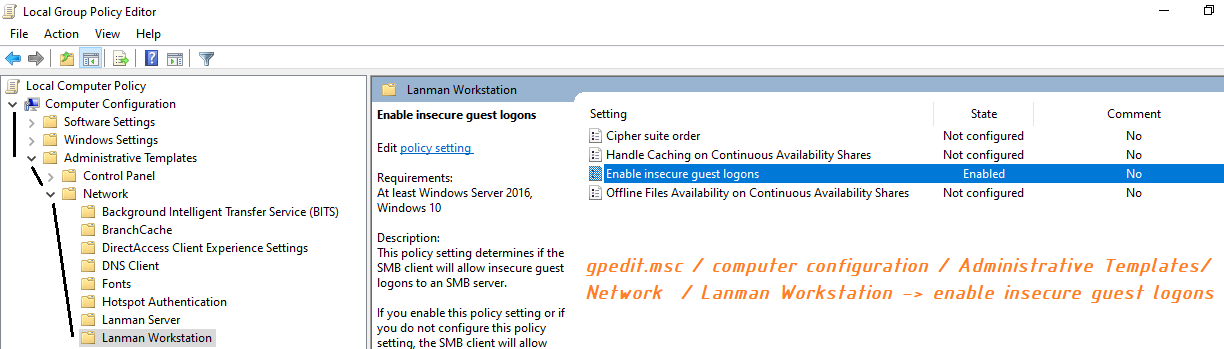
unauthentificated guest access restriction from client pc (default in w19, w10Enterprice)

gpedit.msc / computer configuration / Administrative Templates/ Network / Lanman Workstation -> enable insecure guest logons

Posted in Administration, Linux/Unix, windows | Leave a comment

create .reg file with content inside:
Windows Registry Editor Version 5.00

[HKEY_CLASSES_ROOT\Applications\photoviewer.dll]

[HKEY_CLASSES_ROOT\Applications\photoviewer.dll\shell]

[HKEY_CLASSES_ROOT\Applications\photoviewer.dll\shell\open]
“MuiVerb”=”@photoviewer.dll,-3043”

[HKEY_CLASSES_ROOT\Applications\photoviewer.dll\shell\open\command]
@=hex(2):25,00,53,00,79,00,73,00,74,00,65,00,6d,00,52,00,6f,00,6f,00,74,00,25,\
00,5c,00,53,00,79,00,73,00,74,00,65,00,6d,00,33,00,32,00,5c,00,72,00,75,00,\
6e,00,64,00,6c,00,6c,00,33,00,32,00,2e,00,65,00,78,00,65,00,20,00,22,00,25,\
00,50,00,72,00,6f,00,67,00,72,00,61,00,6d,00,46,00,69,00,6c,00,65,00,73,00,\
25,00,5c,00,57,00,69,00,6e,00,64,00,6f,00,77,00,73,00,20,00,50,00,68,00,6f,\
00,74,00,6f,00,20,00,56,00,69,00,65,00,77,00,65,00,72,00,5c,00,50,00,68,00,\
6f,00,74,00,6f,00,56,00,69,00,65,00,77,00,65,00,72,00,2e,00,64,00,6c,00,6c,\
00,22,00,2c,00,20,00,49,00,6d,00,61,00,67,00,65,00,56,00,69,00,65,00,77,00,\
5f,00,46,00,75,00,6c,00,6c,00,73,00,63,00,72,00,65,00,65,00,6e,00,20,00,25,\
00,31,00,00,00

[HKEY_CLASSES_ROOT\Applications\photoviewer.dll\shell\open\DropTarget]
“Clsid”=”{FFE2A43C-56B9-4bf5-9A79-CC6D4285608A}”

[HKEY_CLASSES_ROOT\Applications\photoviewer.dll\shell\print]

[HKEY_CLASSES_ROOT\Applications\photoviewer.dll\shell\print\command]
@=hex(2):25,00,53,00,79,00,73,00,74,00,65,00,6d,00,52,00,6f,00,6f,00,74,00,25,\
00,5c,00,53,00,79,00,73,00,74,00,65,00,6d,00,33,00,32,00,5c,00,72,00,75,00,\
6e,00,64,00,6c,00,6c,00,33,00,32,00,2e,00,65,00,78,00,65,00,20,00,22,00,25,\
00,50,00,72,00,6f,00,67,00,72,00,61,00,6d,00,46,00,69,00,6c,00,65,00,73,00,\
25,00,5c,00,57,00,69,00,6e,00,64,00,6f,00,77,00,73,00,20,00,50,00,68,00,6f,\
00,74,00,6f,00,20,00,56,00,69,00,65,00,77,00,65,00,72,00,5c,00,50,00,68,00,\
6f,00,74,00,6f,00,56,00,69,00,65,00,77,00,65,00,72,00,2e,00,64,00,6c,00,6c,\
00,22,00,2c,00,20,00,49,00,6d,00,61,00,67,00,65,00,56,00,69,00,65,00,77,00,\
5f,00,46,00,75,00,6c,00,6c,00,73,00,63,00,72,00,65,00,65,00,6e,00,20,00,25,\
00,31,00,00,00

[HKEY_CLASSES_ROOT\Applications\photoviewer.dll\shell\print\DropTarget]
“Clsid”=”{60fd46de-f830-4894-a628-6fa81bc0190d}”

Save, right click mouse on it to merge it, and then make it as a default for pictures.
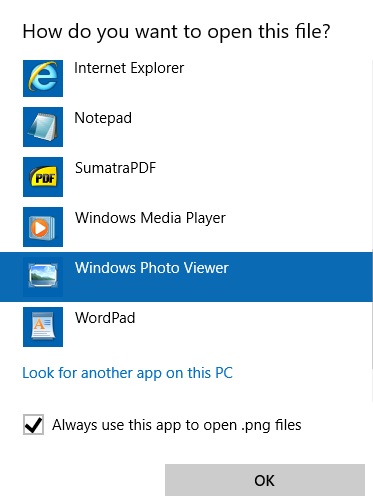
tested on w10-64 1809
Posted on by sta.ee | Leave a comment

windows hosts file location C:\Windows\System32\drivers\etc

windows7,8,10,2012, 2016 hosts file location C:\Windows\System32\drivers\etc

Posted in Administration, windows | Leave a comment

rotate video with ffmpeg or avconv

Rotate 90 clockwise:

ffmpeg -i in.mp4 -vf "transpose=1" out.mp4 

rotation parameters as follows:

0 = 90CounterCLockwise and Vertical Flip (default)
1 = 90Clockwise
2 = 90CounterClockwise
3 = 90Clockwise and Vertical Flip

https://askubuntu.com/questions/83711/how-can-i-rotate-a-video

Posted in Uncategorized | Leave a comment

Debian version

some ways to find out debian version:

root@pom:/etc# cat /etc/issue
Debian GNU/Linux buster/sid \n \l

root@pom:/etc# cat /etc/debian_version
buster/sid

root@pom:/etc# cat /etc/os-release
PRETTY_NAME=”Debian GNU/Linux buster/sid”
NAME=”Debian GNU/Linux”
ID=debian
HOME_URL=”https://www.debian.org/”
SUPPORT_URL=”https://www.debian.org/support”
BUG_REPORT_URL=”https://bugs.debian.org/”

root@pom:/etc# lsb_release -da
No LSB modules are available.
Distributor ID: Debian
Description: Debian GNU/Linux testing (buster)
Release: testing
Codename: buster

https://linuxconfig.org/check-what-debian-version-you-are-running-on-your-linux-system

Posted in Administration, Linux/Unix | Leave a comment

mdadm replace broken drive on Debian Jessie

If the drive should be replaced, then
1. start with determining which one is broken. See details of md device
# mdadm –detail /dev/mdX
# smartctl -a /dev/sdY 

smartmontools required to be installed

2. replace required drive physically

3. See if the drive appeared
# lshw | grep /dev/sd[a-z]$ -A 3 -B 3

4. Careful! Transfer partition information from working disk to new installed disk
# sfdisk -d /dev/SOURCEDISK | sfdsik /dev/TARGETDISK
if source disk is sda for example, target sdb, then:
# sfdisk -d /dev/sda | sfdsik /dev/sdb

5. add partitions to md drives
# mdadm /dev/mdX –add /dev/sdY1

6. enjoy to watch progress of rebuild
$ watch -n 10 cat /proc/mdstat

7. If failed drive is not removed automatically from mdadm configuration, remove it by “–remove” command. It might require to set that drive failed, read man mdadm how to do it.

8. If mdX device is bootable device, then it is needed to cause system to boot from devices in mdX. In case grub is used, then:
# grub-install /dev/sdY

Posted in Administration, hardware, Linux/Unix | Leave a comment

rdp client from linux. Freerdp, xfreerdp

The best rdp client on linux I found to work is the freerdp
usage from console:

$ xfreerdp /u:lamer /w:1024 /h:768 /v:1.2.3.4:13389 +clipboard /a:drive,home,/home
Simple options that required mostly:
/v:<server>[:port] Server hostname
/port:number Server port
/w:<width> Width
/h:<height> Height
/size:<width>x<height> Screen size
/f Fullscreen mode
Clipboard Redirection: +clipboard

Drive redirection will make a “home” named network disk on the server machine:
Drive Redirection: /a:drive,home,/home

https://github.com/awakecoding/FreeRDP-Manuals/blob/master/User/FreeRDP-User-Manual.markdown

Posted in Administration, Linux/Unix, windows | Leave a comment

w8.1, 2012, 10 startup folder shell:startup

As simple as start->run(win+r)-> shell:startup
Works on w10 pro ver1709 build16299.125
Win2012r2 standard
Win8.1

Posted in Administration, windows | Leave a comment

rename mdadm raid name

changing drives to bigger once caused to create new md raid device for copying files from old md4 to new md127 device. After that should the md4 physically removed and md127 renamed to md4 for other settings compatibility.

first unmount all md devices, then stop md raid:
#mdadm –stop /dev/md127

now rename device (for new meta 1.x, if older, might not work)
#mdadm –assemble –update=name –name=2 /dev/md4 /dev/sdc1

On debian jessie also initramfs should be updated to not to cause old name after reboot:
#update-initramfs -u

now try to mount device and add missing drive to md array.

Posted in Linux/Unix | Leave a comment